 Lunchbox Blog
How to put a lunchbox note on your Home Screen

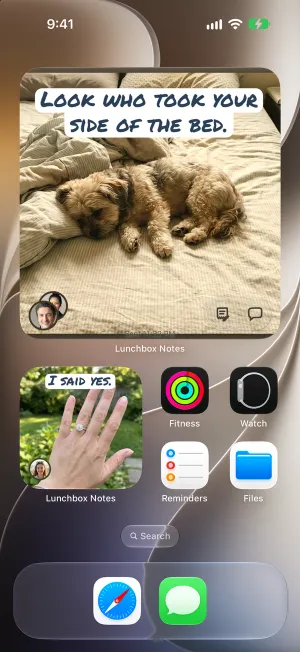
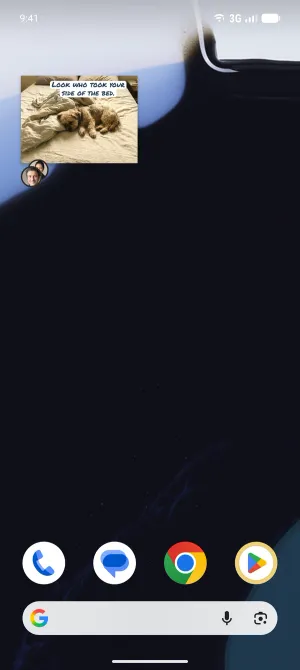
The Lunchbox Notes widget puts a friend’s latest note right on your Home Screen, so you see it every time you pick up your phone. When they send a new one, it changes by itself.

New to Lunchbox Notes? Start with what a lunchbox note is.
Add it
- Hold an empty spot on your Home Screen until the icons wiggle.
- Tap the brush at the top, then Add Widget.
- Find Lunchbox Notes, pick a size, and tap Add Widget.

Big or small
The small widget is just the note. The big one also has buttons to write back and to chat.
Choose whose note
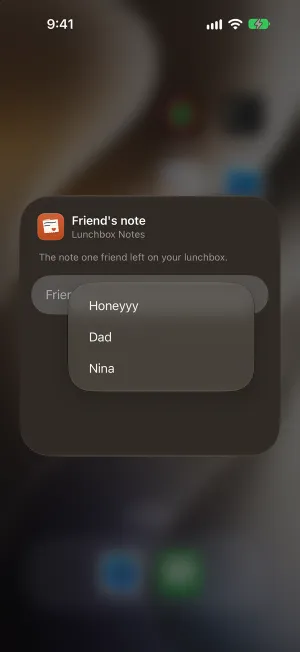
A new widget shows the newest note from anyone. To pick a friend, hold the widget, tap Edit Widget, and choose who. You can add one for each person you love.
For a group, there is a Group notes widget too: how groups work.
On the Lock Screen
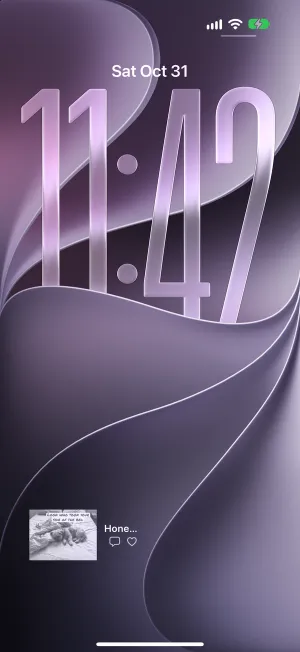
A small copy of the note can sit on your Lock Screen as well, under the clock. It shows the whole note, words and all, before you unlock your phone, so anyone who sees your phone can read it. Choose whose note goes there.
On Android
Hold an empty spot on your home screen, tap Widgets, and find Lunchbox Notes. The same widgets are there.
Try it now: Lunchbox Notes is in beta.
iPhone opens TestFlight, Apple’s app for trying apps before they’re out. Android opens Google Play.
Rather wait for the App Store and Google Play? Get an email when it’s out.